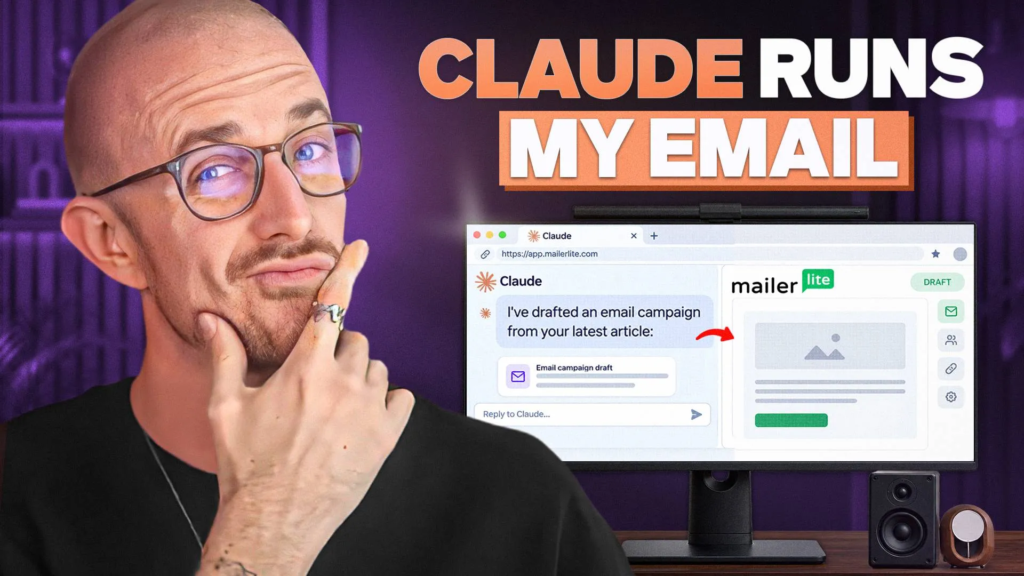
I requested Claude one query about my e mail listing, and it quietly began working the entire thing. That’s AI e mail advertising in apply… you join a generative AI instrument to your e mail advertising platform, and it accelerates work that used to eat a day.
Earlier than I touched a single dashboard, Claude advised me I had 64,299 lively subscribers, which fields I’d been accumulating, and the place most of these individuals got here from. This works due to MailerLite’s MCP connector, which lets AI instruments like Claude and ChatGPT function proper inside your account.
Right here’s the complete video walkthrough I recorded whereas setting all of it up from scratch.
Key Takeaways for Operating E-mail Advertising with Claude and AI
- Connecting Claude to MailerLite takes a couple of minute. No code, no API keys, only a customized connector and one approval display.
- The MCP connector is included on each MailerLite plan, even the free one, although plans have limits on subscribers, month-to-month sends, and automations.
- Claude can audit your listing and construct segments out of your signup tags, flip a weblog article right into a draft e mail marketing campaign, and create a welcome automation from a spoken description.
- Claude works from samples of your listing, not each contact one after the other. The segments it builds nonetheless apply to everybody.
- Every thing that may attain your subscribers waits on your approval. You must all the time be the one to hit ship.
Let AI Construct and Run Your E-mail Advertising: MailerLite

MailerLite is what I run this complete AI workflow on. The MCP connector comes free on each plan, so you may join Claude and begin constructing segments and automations instantly. Use my hyperlink to seize the perfect deal they’ve acquired and assist help the channel!
How you can Join Claude to Your E-mail Platform with MCP
An MCP connector is mainly a bridge between Claude and your e mail advertising platform, constructed on an open commonplace referred to as the Model Context Protocol. As soon as it’s in place, Claude can learn what’s in your account, together with subscriber knowledge, and draft issues inside it.
That knowledge entry is what makes actual e mail personalization potential, since Claude writes primarily based on who’s really in your listing. Something that may attain your subscribers nonetheless waits so that you can personally approve it, which is the entire cause I’m snug utilizing this with my actual listing.
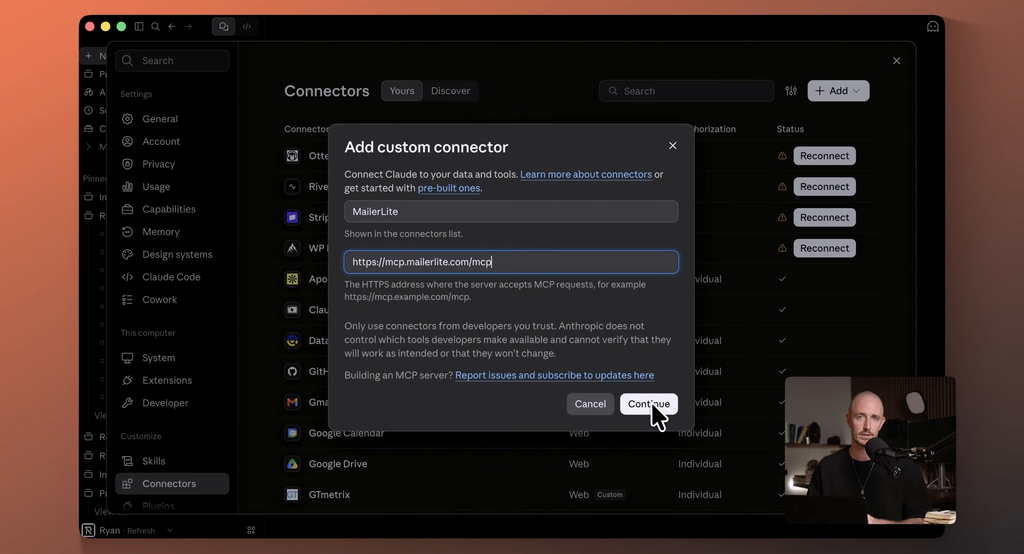
Setup is fast and solely takes a couple of clicks.
- In Claude, open settings, then connectors, and add a customized connector.
- Title it MailerLite and paste their MCP server tackle.
- Hit join, signal into MailerLite, and approve entry.
That’s it, with no code and no API keys. MailerLite’s personal information covers the connection steps for different instruments too.
In case you spend your time in ChatGPT or Cursor as an alternative of Claude, their setup information handles these as nicely. The prompts I’ll share under ought to work the identical method with perhaps a little bit rewording.
What Claude Did with My E-mail Record (Actual Prompts and Outcomes)
Right here’s the sport plan I ran. Each immediate I used is linked on my weblog, so you may seize them and put them to work by yourself listing.
If you wish to write sharper ones, my information to ChatGPT prompts for bloggers walks by way of my entire strategy.
Auditing My Record With out Opening a Dashboard
My first immediate requested 4 issues.
- What number of lively subscribers do I’ve
- What customized fields am I accumulating
- Which teams and segments exist already
- What are the three issues that stand out to you
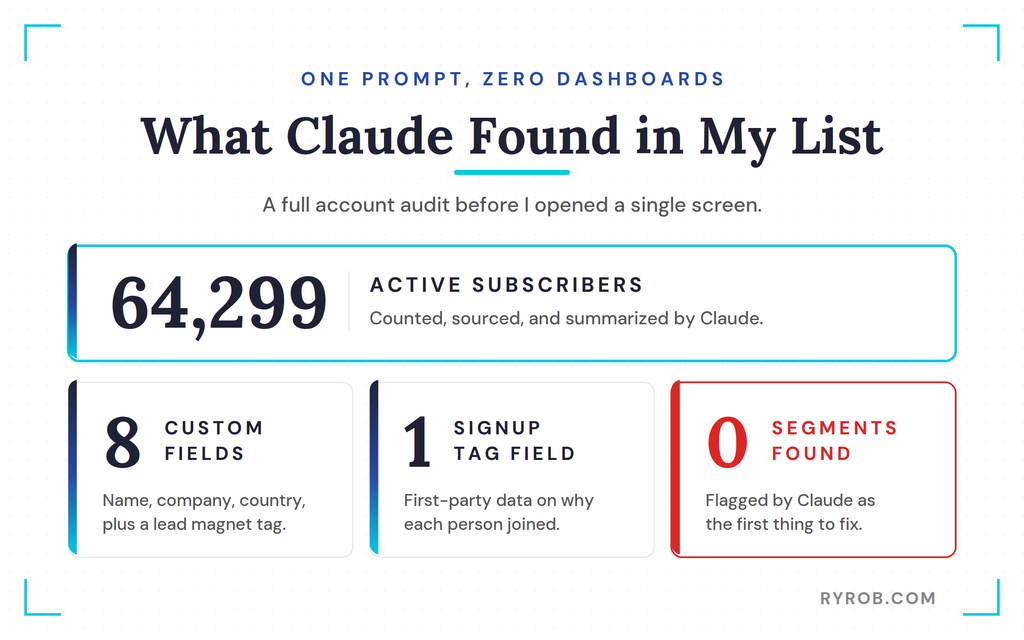
Claude ran by way of a couple of approvals to entry my account, then got here again with the products. 64,299 lively subscribers.
Eight customized fields, all the standard stuff like title, firm, and nation, plus a customized subject for tags that marks which lead magnet every individual signed up for. That tag is my first-party knowledge, collected straight from the signup kind, and it tells me the place individuals got here from and why they’re right here.
It additionally reported zero segments, and accurately referred to as that an issue. Segmentation is a cornerstone of excellent e mail advertising, as a result of sending the identical message to everybody ignores what every subscriber really cares about.
It issues much more as what you are promoting grows and you’ve got a number of choices. All the time know who you’re sending to.
Constructing Subscriber Segments from My Lead Magnet Tags
Since my account was new, Claude provided to create segments primarily based on my foremost tags, the stuff individuals signed up with the intention to get. I stated let’s do it, then requested it to recommend the segments value constructing, clarify why, and create them.
One trustworthy be aware on how this works. Claude pulled a pattern of my listing slightly than studying all 64,000 contacts one after the other.
It’s working from samples MailerLite fingers it, which is loads to get began, and the segments apply to everybody on the listing.
Underneath subscribers, then segments, there they had been. Three segments with precisely how many individuals in every, and I didn’t click on by way of a single filter menu to construct them.
Good segmentation additionally units you up for behavior-based emails later, since every section offers you a transparent viewers for a selected motion or curiosity.
Truthfully, this alone is one thing I’d usually skip in a special e mail instrument, as a result of discovering granular knowledge and constructing segments on it used to imply clicking by way of 5 screens at finest. This can be a job I now run each week.
Turning a Weblog Article right into a Draft Marketing campaign
Subsequent up is the duty I’ll in all probability use most, turning one thing I’ve already written into an e mail for my viewers. A number of these posts started as AI-assisted drafts, so this step mainly closes the loop. Right here’s the immediate I used.
I requested Claude to learn an article from my website and draft a MailerLite marketing campaign from it for one of many segments we simply constructed. I advised it to incorporate a brief intro in my voice, three takeaways, and a hyperlink again to the complete article.
Then the important thing line, go away it as a draft.
That go away it as a draft line is doing quite a lot of work. AI instruments thrive on specificity, so all the time be clear in your directions.
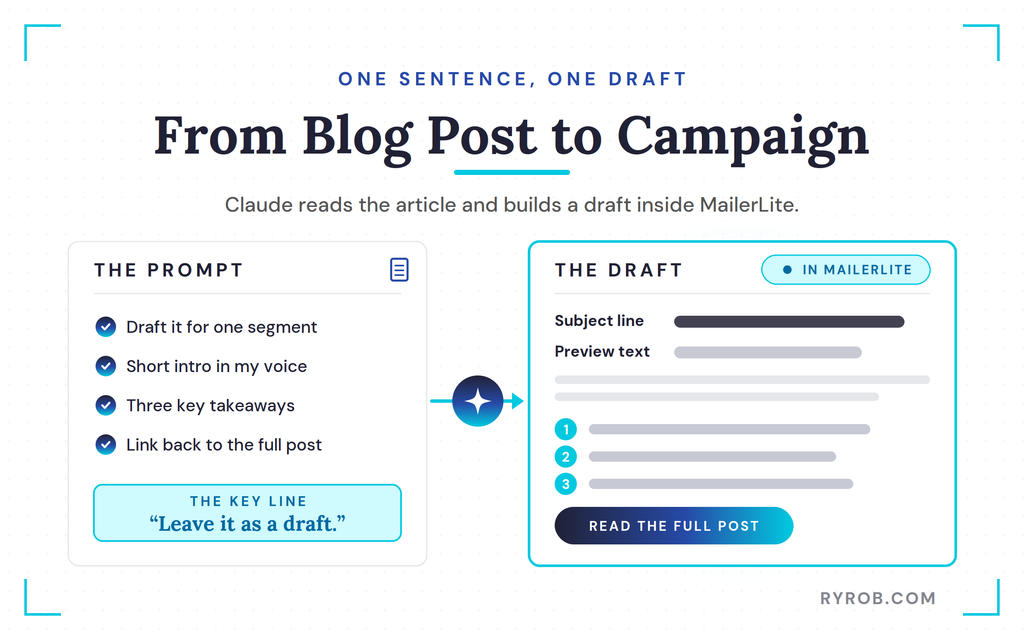
In case you don’t need a instrument sending an e mail to 64,000 individuals in your behalf, say so. MailerLite is about as much as draft first anyway, however I like saying it out loud so there’s no ambiguity.
Claude handed me a direct hyperlink, and the draft landed proper inside MailerLite’s editor with the topic line, preview textual content, my intro, and the three takeaways. That topic line got here from the identical immediate, so it really works like an AI topic line generator after I need a couple of choices to check.
Is that this precisely how I’d write the e-mail myself? Not fairly, and I nonetheless frolicked tuning up the copy. As a primary draft that took me one sentence to ask for, although, I used to be tremendous proud of it.
Making a Welcome Automation by Describing It Out Loud
A welcome sequence is a kind of issues each enterprise wants. In case you’re asking individuals to hitch your listing, welcoming them is the way you begin issues off on the correct foot.
It’s additionally the e-mail job most individuals I do know maintain laying aside for months as a result of it appears daunting. Definitely worth the push, although, as a result of welcome emails persistently pull a few of the highest open charges you’ll see in your entire listing.
I described this one the best way I’d clarify it to anybody. When somebody joins my bloggers group, ship a welcome e mail instantly.
Then two days later, ship a second one pointing them to my three hottest articles. Construct it as a draft, don’t flip it on, and run a dry check.
About 5 seconds later, Claude had constructed the entire thing inside MailerLite. It confirmed each emails had been loaded in, that the dry run handed, and that it was set to draft mode.
Underneath automations, there all of it was, the set off, the welcome e mail, the 2 day wait, and the second e mail, all sitting as a draft and switched off. This type of e mail automation normally takes a day to arrange by hand.
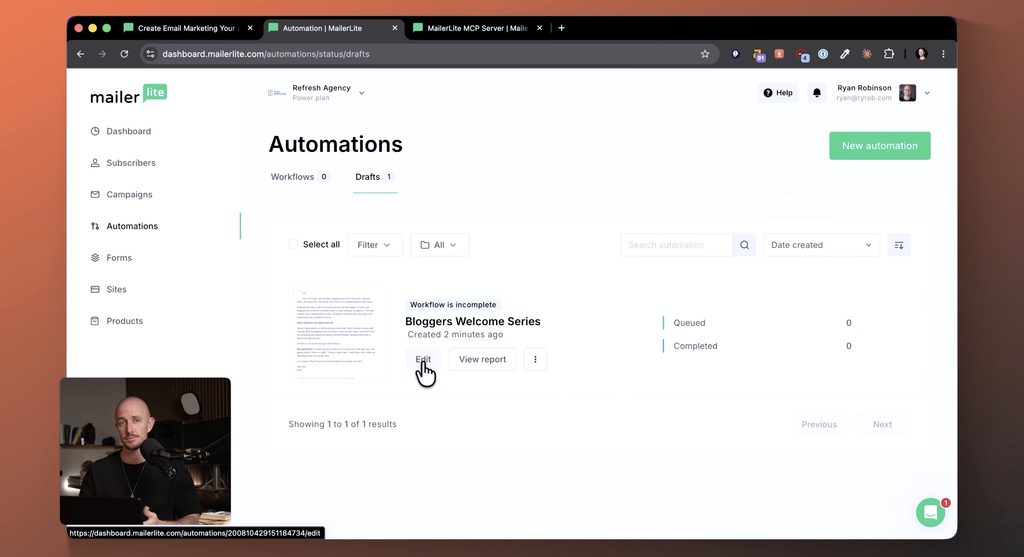
It’s additionally the best piece of a lifecycle e mail journey to construct, since a welcome sequence greets each new subscriber the identical method from day one. One immediate and a fast evaluate as an alternative of months of procrastination.
As soon as I reviewed it, I activated it, so new individuals in my bloggers group now get my finest content material mechanically.
I teamed up with MailerLite on this one, so if you wish to comply with alongside, you can begin free with my link to MailerLite.
The place Claude’s Work Reveals Up Inside MailerLite
Claude is just one method into MailerLite, so let me present you the place all the things it constructed really lands. The campaigns space holds each draft Claude creates, sitting proper subsequent to the content material you construct by hand.
The subscribers, teams, and fields it learn from earlier stay in right here too. From there, it’s value wanting on the list-building instruments that assist develop your conversion charge.
There are three foremost ones.
- Signup varieties
- Popups
- Touchdown pages
A few of these sit on particular plan tiers, so test what your subscription consists of earlier than you lean on them.
The popup signup varieties include a bunch of templates, from commonplace subscribe bins to spinning wheel promotions. I went with the complete picture background publication opt-in as a result of it simply appears to be like clear.
Contained in the editor you may regulate headline sizes, fonts, and colours. MailerLite additionally helps dynamic content material, which helps you to tailor messages primarily based on subscriber knowledge and elevate engagement.
In case you care about compliance like I do, you may add a privateness coverage hyperlink and add GDPR fields while you need them.
As soon as the popup is formatted, you launch it and select how you can add it to your website. You possibly can copy the JavaScript instantly, or set up the MailerLite plugin for WordPress, which is the route I took.
The One E-mail Advertising Step I Gained’t Hand Over to AI
I requested Claude whether or not our first marketing campaign was able to go and who it will go to. It got here again with a clear abstract of the marketing campaign title, topic line, sender, and the necessary stats pulled from my buyer knowledge.
Technically, Claude might schedule that marketing campaign for me if I requested, and MailerLite is even constructed so nothing sends with out my affirmation. However I am going one step additional in how I run my e mail advertising.
Sending emails with my title on them to actual individuals is my button to push. Each time. No exceptions.
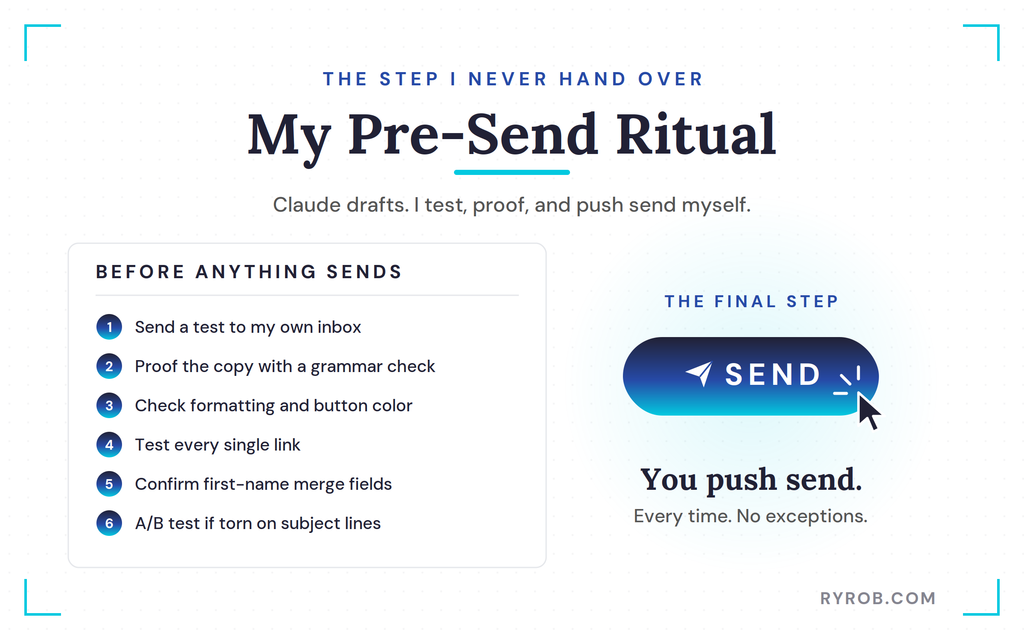
So right here’s my pre-send ritual. As an alternative of sending the stay marketing campaign, I ship a check e mail to my very own inbox proper from MailerLite, so I can proof the copy with my free grammar checker, test the formatting, and check each hyperlink.
The check even pulled in my profile photograph from Gravatar, which was good to see. Seeing the button shade in my very own inbox, I made a decision to change it to one thing extra on model for my shade palette.
Copywise, Claude nailed it, and the formatting seemed nice. The check ship can also be the place I test personalization particulars, like first-name merge fields, as a result of a damaged tag is the quickest strategy to lose a subscriber’s belief. Little particulars like which can be a giant a part of why email marketing works so well for bloggers while you get them proper.
A subscriber who opens an e mail that claims Hello, as an alternative of their title received’t come again for a second one. As soon as I’ve proofed the topic line in opposition to my previous couple of campaigns, I do know whether or not it stands out or blends in.
If I’m torn between two topic traces, that’s after I’d run an A/B check earlier than committing, so the info picks the winner as an alternative of my intestine. Then, and solely then, I push ship.
Trustworthy Limits Earlier than You Attempt AI E-mail Advertising
A number of issues are value realizing earlier than you join Claude to your personal account.
- Connecting means giving it entry to your MailerLite knowledge. That’s how any integration works, and it’s the rationale any of that is potential.
- Claude’s copy nonetheless wants a human test. It’s a primary draft on the pace of typing, and also you’re nonetheless the editor.
- Each plan has limits. The MCP connection is included on every one, even the free plan, however you’ll hit caps on subscribers, month-to-month sends, and automations relying in your tier.
I’m on MailerLite’s energy plan, which is constructed for scale. As your listing grows, you additionally want to observe its well being.
Churn prediction, which flags subscribers who cease opening, protects your deliverability, as a result of web service suppliers deal with low engagement as a sign to filter your emails away.
Progress normally means what you are promoting is rising too, and e mail can simply turn out to be your highest ROI advertising channel, greater than paying for the instruments you run it with. MailerLite’s machine studying options, like predictive analytics on ship instances and hyperlink clicks, work alongside what Claude writes.
Higher content material written with AI writing tools additionally retains subscribers opening, and engaged subscribers are what drive ROI within the first place.
If you wish to dig into the expansion aspect, my breakdown of email marketing strategies for bloggers covers it in additional element.
FAQs About AI E-mail Advertising with Claude and MailerLite
Earlier than you dive in, listed here are the questions I get requested most about working this setup.
Does the MCP connector value additional?
No. MailerLite consists of the MCP connector on each plan, together with the free one. Plans do carry limits on subscribers, month-to-month sends, and automations, so decide the tier that matches your listing measurement.
Does Claude ship emails mechanically?
No. MailerLite is about up so nothing reaches your subscribers with out your affirmation, and Claude builds campaigns and automations as drafts first. I nonetheless evaluate and ship all the things myself.
Does this work with ChatGPT as an alternative of Claude?
Sure. MailerLite’s setup information covers ChatGPT, Cursor, and different AI instruments, and the prompts I used ought to work the identical method with perhaps a little bit rewording.
Do I have to know how you can code?
By no means. You add a customized connector in Claude, paste the MCP server tackle, check in, and approve entry. No code and no API keys.
Remaining Ideas About AI E-mail Advertising
This AI e mail advertising setup was the quickest I’ve ever constructed. Claude dealt with the repetitive work of constructing segments, drafting campaigns, and organising the welcome automation, whereas I stored all of the judgment and management over sending.
That mixture of pace and management is what makes this workflow value copying. It additionally left room for higher e mail personalization, as a result of Claude drafted variants rapidly sufficient that I might tailor messages to every section as an alternative of sending one generic blast.
To strive it your self, begin free, join utilizing the identical course of I used, and steal the prompts from this information. Simply keep in mind the one rule that issues.
You’re all the time the one who pushes ship.
Let AI Construct and Run Your E-mail Advertising: MailerLite
MailerLite is what I run this complete AI workflow on. The MCP connector comes free on each plan, so you may join Claude and begin constructing segments and automations instantly. Use my hyperlink to seize the perfect deal they’ve acquired and assist help the channel!